
Astro vs WordPress: A Developer’s 2026 Performance Guide
Published on: November 11, 2026
If you are a developer or a curious learner wondering whether Astro vs WordPress is a debate worth your time, the short answer is yes – but not for the reasons the hype suggests. Astro is not a drop-in WordPress replacement. It is a fundamentally different way of thinking about building for the web, and that distinction matters more than any benchmark chart you have seen on social media. By the end of this guide, you will understand exactly where Astro wins, where it falls short, and how pairing it with SolidJS creates a performance profile that WordPress simply cannot match without heavy engineering.
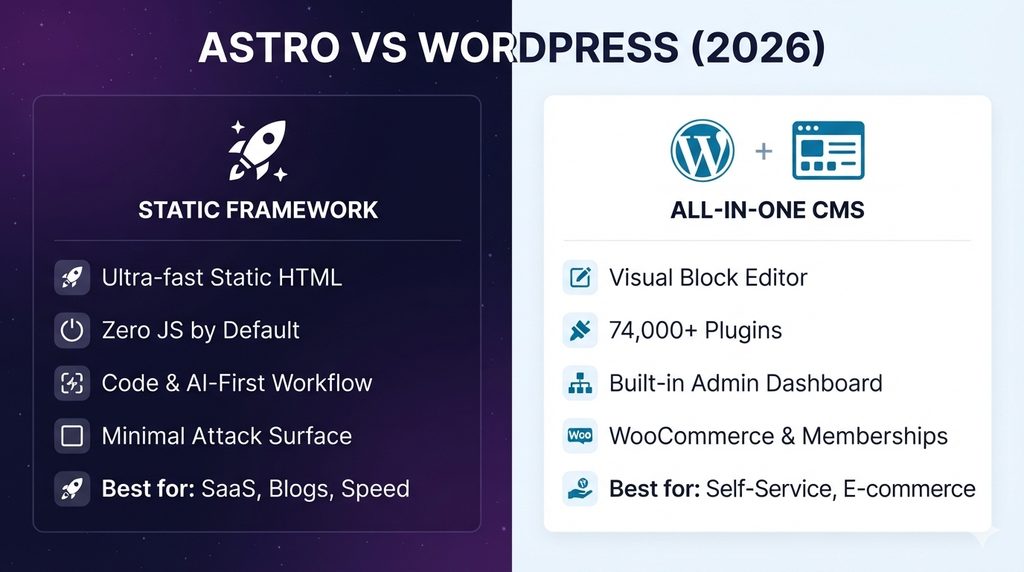
The Core Difference: Static Generation vs Dynamic Rendering
WordPress renders every page on demand. A visitor requests a URL, PHP talks to a MySQL database, assembles the HTML, and sends it back. Astro, by default, does none of that at request time. It generates static HTML files at build time, ships them to a CDN, and serves them as plain files. Consequently, there is no database query, no PHP execution, and no server-side rendering bottleneck on the critical path.
This architectural gap explains why Astro sites tend to be lighter. Search Engine Journal’s April 2026 analysis found that Astro had the lightest median page weight in its dataset at 1.65 MB, while WordPress sat at roughly 2.63 MB . Lighter pages do not automatically guarantee better Core Web Vitals, but they remove a significant amount of friction.
What the Performance Numbers Actually Show
A real-world migration case study provides some of the clearest data available. After moving a blog from WordPress to Astro, the developer recorded these average Lighthouse results across the homepage and ten posts :
| Metric | WordPress | Astro | Difference |
|---|---|---|---|
| Performance Score | 99.1 | 99.5 | +0.4 |
| SEO Score | 86.0 | 100.0 | +14.0 |
| LCP | 0.81s | 0.44s | -0.37s |
| TTFB | 83.1ms | 68.3ms | -14.8ms |
| JavaScript Size | 13.4KB | 5.3KB | -60.4% |
| CSS Size | 67.2KB | 6.6KB | -90.2% |
Notice the nuance here. The performance scores were already close because that WordPress site was well-optimised. The real separation appeared in SEO scoring and asset weight. The Astro version achieved a perfect SEO score while dramatically reducing the amount of CSS and JavaScript shipped. For developers building content-heavy sites where crawl efficiency and rendering speed matter, that gap is the actionable insight.
Where WordPress Still Makes Sense
Before you delete your WordPress installation, consider what you would lose. WordPress provides a mature editing interface, a plugin ecosystem that solves problems Astro developers still handle manually, and a lower barrier to entry for non-technical stakeholders. The Patchstack 2026 report recorded over 11,000 vulnerabilities in the WordPress ecosystem, but roughly 91% originated in plugins. A disciplined WordPress site with minimal plugins is not the security disaster that alarmist headlines suggest.
Ultimately, the question is not which platform is “better.” It is whether your project needs a content management system at all. As Yoast founder Joost de Valk observed, people never actually wanted a CMS – they wanted a website . For teams that need editorial workflows, user roles, and non-technical publishing, WordPress remains a reasonable answer. For developers building marketing sites, documentation, blogs, or portfolios where content changes through code or Markdown, Astro removes layers of complexity that were never necessary.
Setting Up SolidJS in Astro (and Why It Matters for Speed)
Astro’s default behavior is to ship zero client-side JavaScript. That is excellent for static content, but modern sites need interactive elements. This is where Astro Islands come in, and SolidJS is one of the leanest frameworks you can hydrate an island with.
The Setup
Astro provides an official integration that handles the configuration for you. From your project directory, run :
bash
npx astro add solid
The command installs @astrojs/solid-js and updates your astro.config.mjs automatically. If you prefer manual installation, you install the package and register the integration in your config file. You also need to set "jsx": "preserve" and "jsxImportSource": "solid-js" in your tsconfig.json .
Once configured, you can import a SolidJS component into any Astro page. The key decision is the hydration directive. Adding client:load tells Astro to hydrate that component immediately on page load. Adding client:visible defers hydration until the component scrolls into view. Therefore, a comment section can hydrate lazily while a critical interactive widget loads immediately.
Why SolidJS Boosts the Performance Argument
SolidJS compiles components to fine-grained reactive DOM operations rather than using a virtual DOM. The practical result is a tiny runtime and fast updates. When you combine Astro’s static shell with SolidJS islands, you get a page where 90% of the content is pre-rendered HTML and only the interactive 10% ships JavaScript. By shifting the JavaScript burden to isolated islands, you preserve the Lighthouse scores that make Astro attractive in the first place.
This combination directly strengthens the Astro vs WordPress comparison. A WordPress site with a page builder loads JavaScript for the builder, the theme, the plugins, and the interactive components—all competing for main-thread time. An Astro site with SolidJS loads a static HTML document and hydrates only the components that need to be alive.
SEO Benefits That Go Beyond Speed
Speed is a ranking factor, but it is not the only one. Astro’s static output means crawlers receive complete HTML on the first request, with no rendering queue or JavaScript execution required to see the content. This eliminates an entire category of indexing problems that plague JavaScript-heavy frameworks.
Furthermore, Astro’s content collections and file-based routing encourage clean URL structures and predictable metadata patterns. You can still make SEO mistakes in Astro – missing canonical tags, poor heading hierarchy, absent structured data—but the framework does not fight you. The migration case study showed a jump from an 86 to a perfect 100 SEO Lighthouse score, which suggests that Astro’s defaults align more closely with what crawlers want .
The Honest Limitations
Astro is not the right tool for every project. If you need real-time dashboards, complex authentication flows, or heavy server-side personalisation, Astro’s static-first model adds friction. You can add SSR adapters and server endpoints, but at that point you are rebuilding the dynamic capabilities that WordPress or a full-stack framework provides out of the box .
There is also the learning curve for new developers. Astro’s island architecture and component hydration model require a mental shift from the “everything is a SPA” approach that many bootcamps teach. In short, Astro rewards developers who understand when JavaScript is necessary and when it is not.
Final Verdict: A Developer’s Alternative, Not a WordPress Killer
So, is Astro a good alternative to WordPress in 2026? For developers building content-first sites who value performance, SEO clarity, and a modern component workflow, yes. The Astro vs WordPress decision becomes clear when you stop asking which platform is more powerful and start asking which one matches your project’s actual needs. Consequently, if your site is mostly reading and only occasionally interacting, Astro with SolidJS delivers a lighter, faster, and more SEO-friendly result than a plugin-laden WordPress installation. If you need editorial teams, complex publishing workflows, and a mature plugin ecosystem, WordPress remains a legitimate choice. Ultimately, the right answer depends on whether you need a CMS or just a website—and for a growing number of developers, the answer is the latter.
Looking to Build or Scale Your Digital Product?
Squareloops specializes in full-stack web applications, cross-platform mobile apps in Flutter & React Native, and enterprise Annual Maintenance Contracts (AMC).